A report card system for a special education school
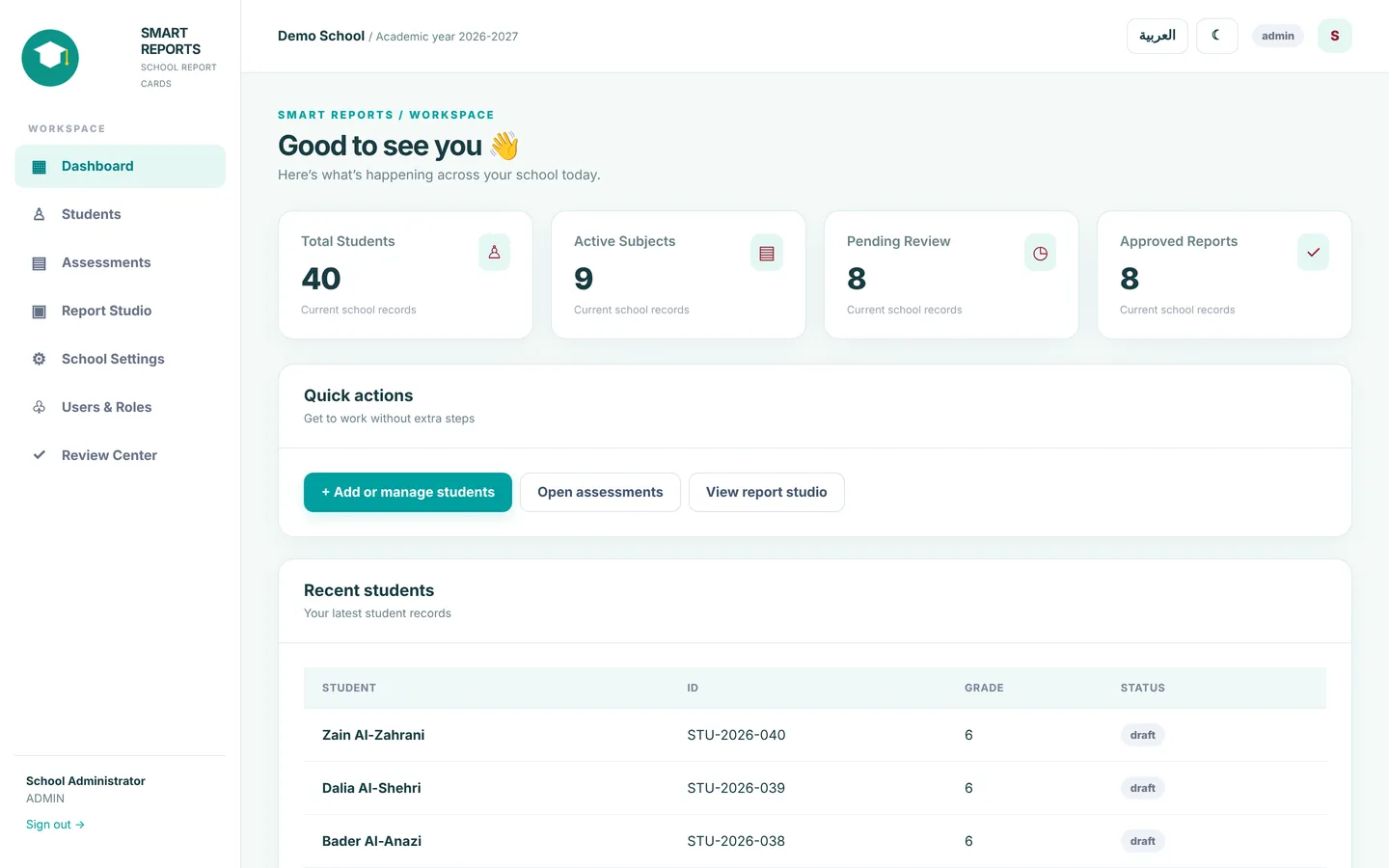
A special education school in Saudi Arabia was producing report cards for three terms in a Word template. I designed and built a complete system for them: teachers only enter grades and comments, and the report card comes out ready, in a layout that never breaks.
- 3
- roles: admin, teacher, reviewer
- 3
- terms in one report card
- +15
- versions built with the client
- A4
- print-ready report card
All names and data in the screenshots are fictional, and the school’s name is withheld for privacy.
The template kept breaking every time.
Peace be upon you
Excuse me, we are a special education school and we need someone to design a report card template for our students, for 3 semesters
I have a similar template but it’s hard. As soon as the teachers work on it and add student data and comments, the formatting breaks, and fixing it takes us a long time
If you can design us an easy template, just with the school’s new logo
I can give you all the details if you can make it for us

- The layout breaksEvery teacher types into the same file, so tables shift and pages split.
- Lost timeSomeone has to fix every report card by hand before printing, for every student and every term.
- No real reviewThere is no clear way to see who is done, who isn’t, and who needs to make changes.
From grades to report card in 4 steps.
Everyone does their own part, and the system puts the rest together.
- 01
The office adds the students
One Excel file with student names, grades and classes, plus a preview before saving that flags any duplicates.
- 02
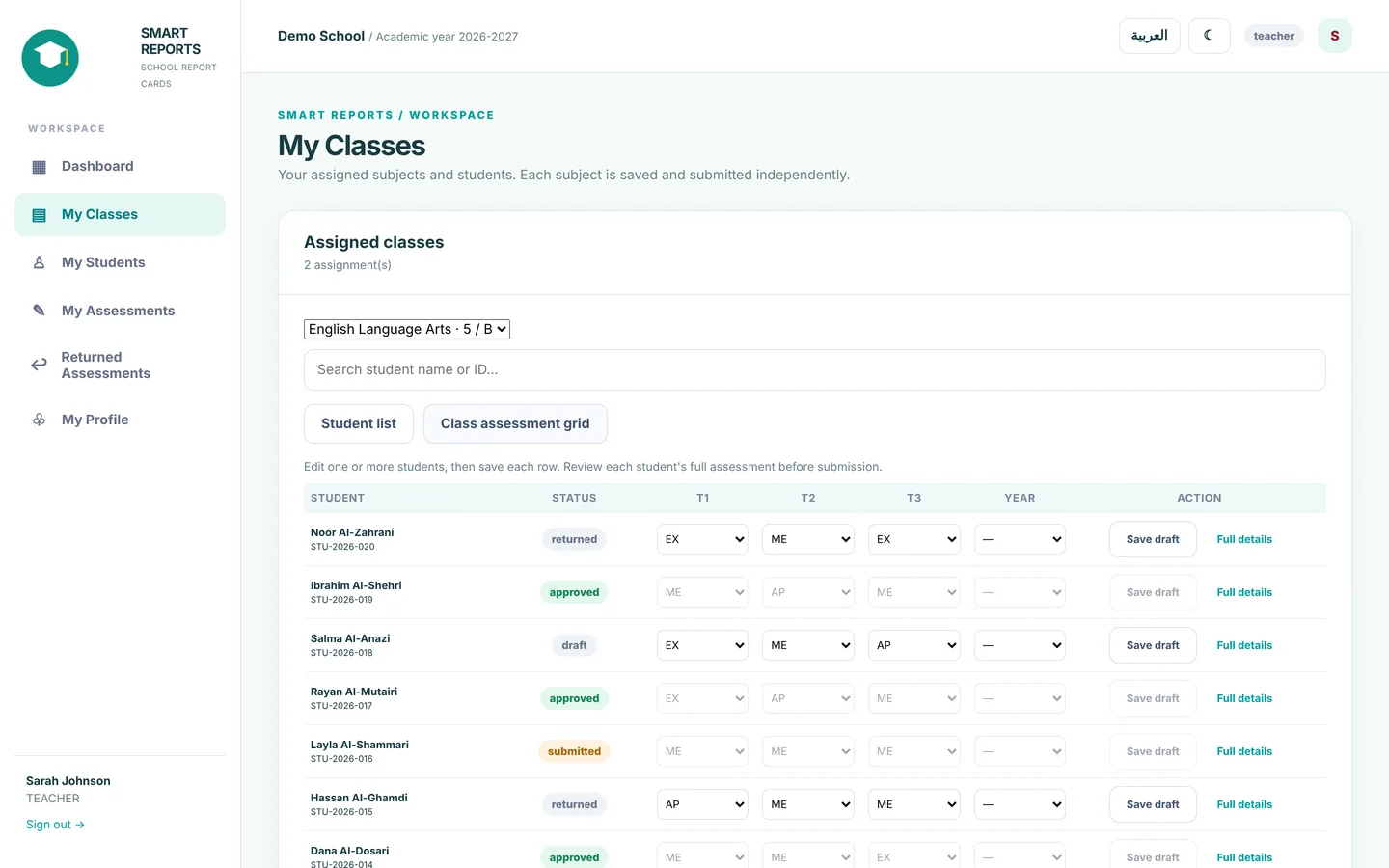
Each teacher grades their class
Teachers only see their own students and subjects, and grade the whole class in one table across terms 1, 2 and 3, saving a draft or sending it for review.
- 03
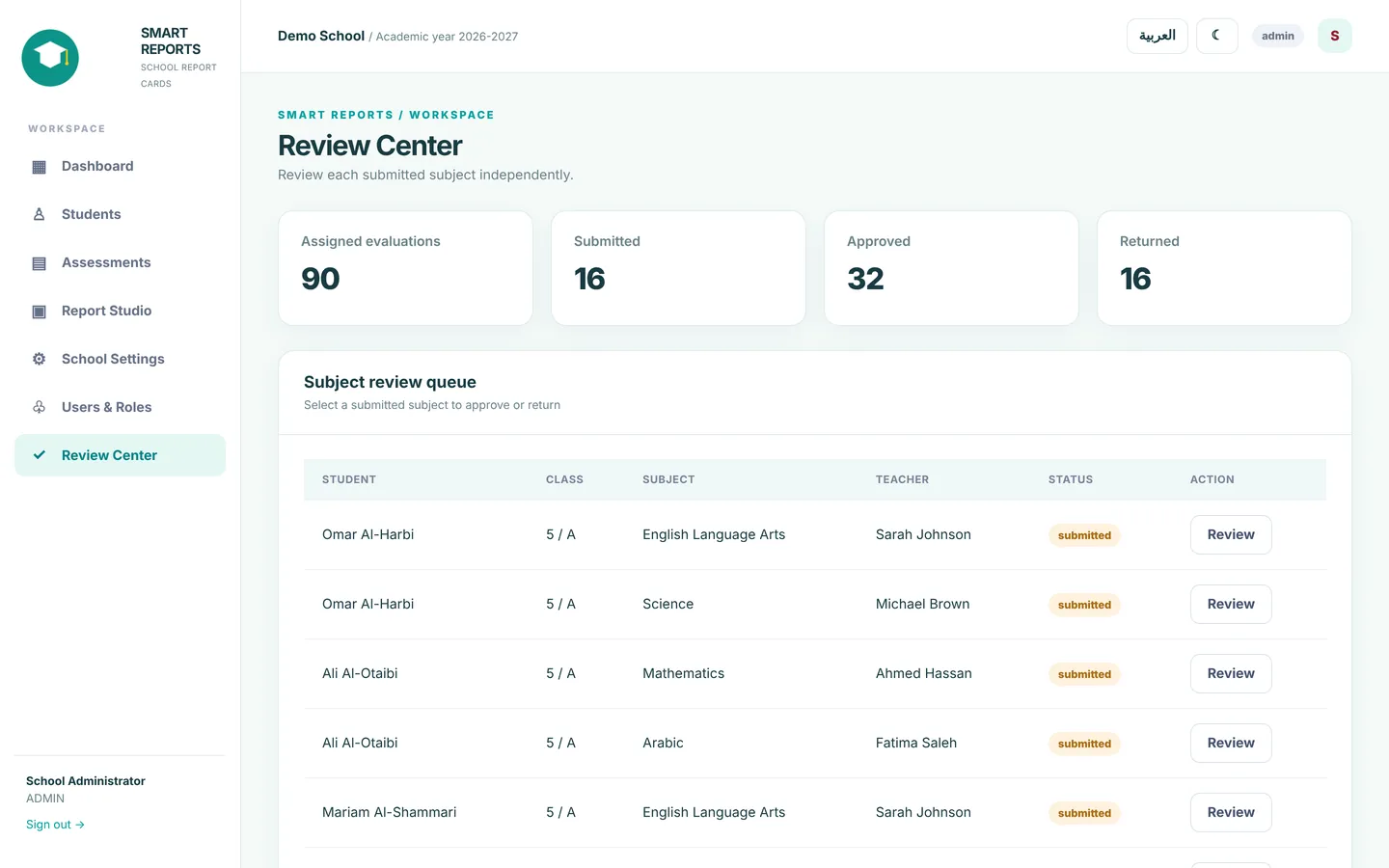
The reviewer approves or returns
Every subject is reviewed on its own. The reviewer approves it, or sends it back with a reason, and the teacher finds it under returned assessments.
- 04
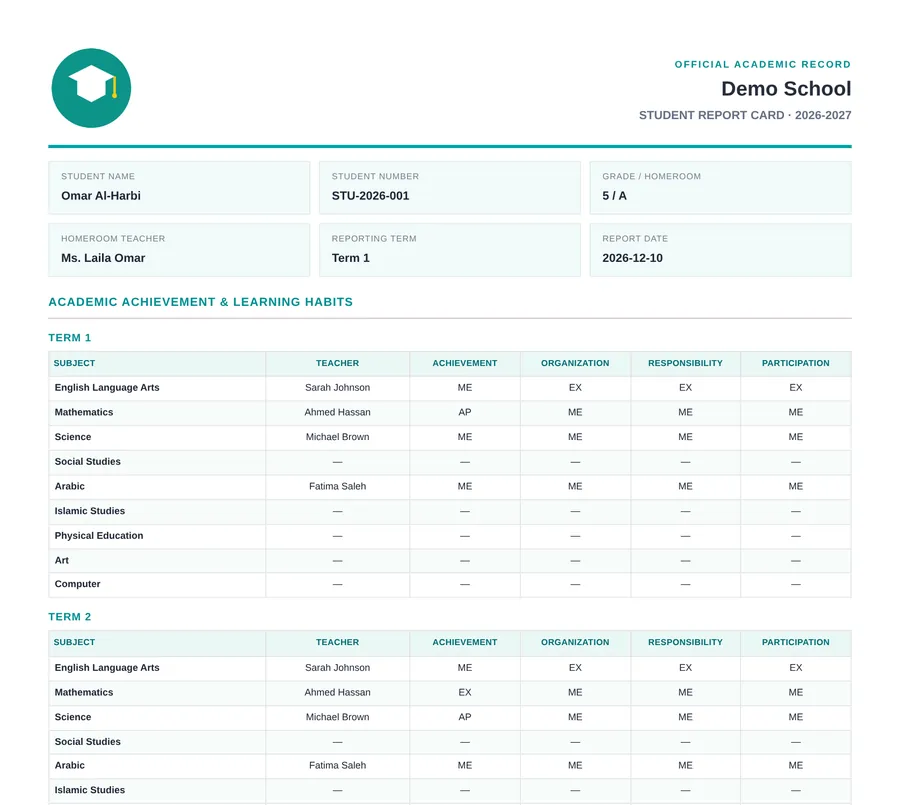
The report card comes out ready
A two-page A4 report card with a fixed layout that never breaks: grades, learning habits, attendance, comments and signatures. Print it or save it as PDF.
Built around how the school works.
Students, staff and subjects, with column matching and a preview before saving.
Admin, teacher and reviewer, and each one only sees what is theirs.
Teachers save and come back later, and anything sent for review stays locked until it is answered.
“6” and “Grade 6” are the same grade, without ever mixing class A with class B.
Nobody touches the design, so the layout never breaks no matter what goes into the comments.
The interface works in both languages, with light and dark modes.
It runs on the school’s own computer, so student data never leaves the school.
A desktop icon opens the system in the browser right away.
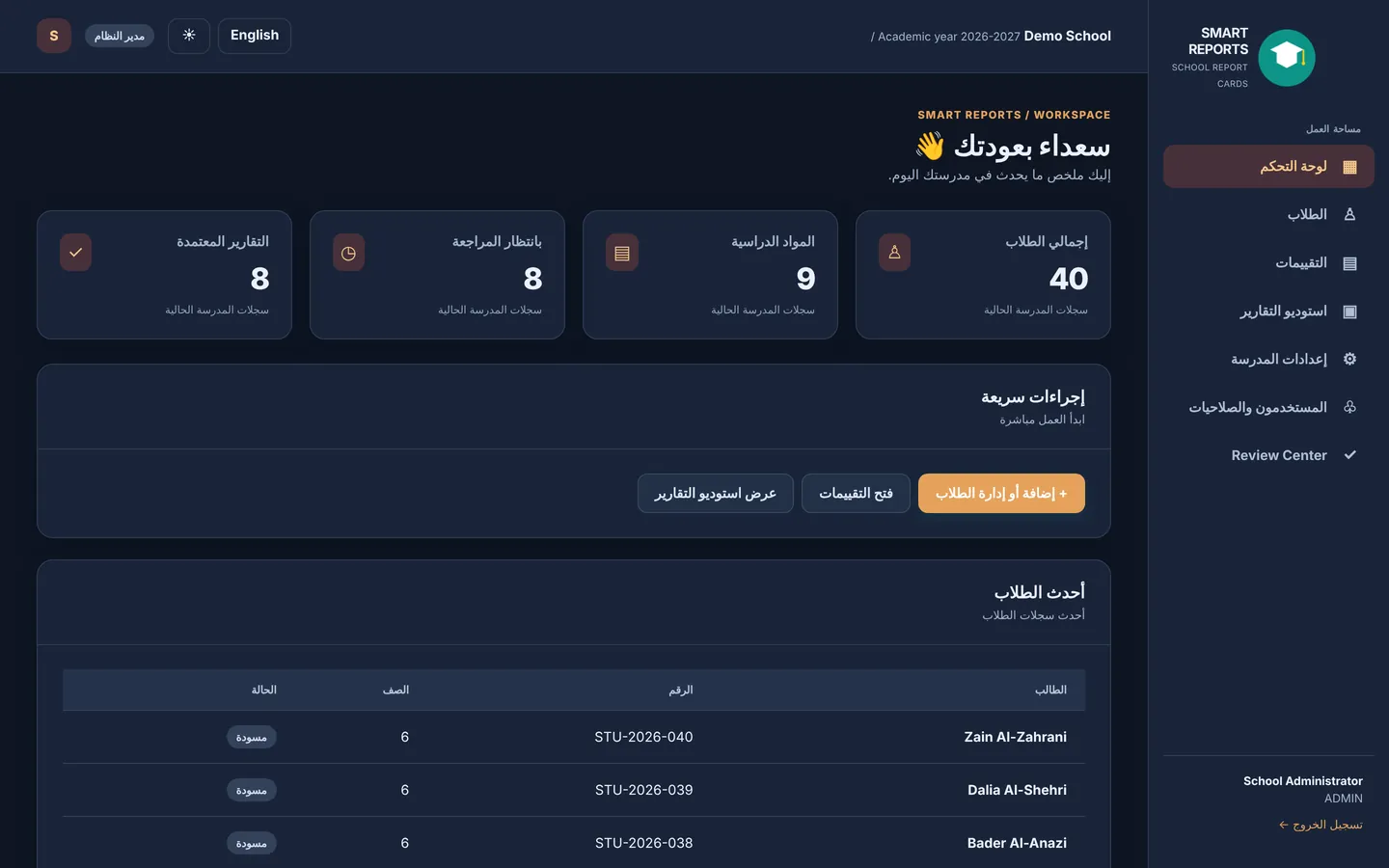
Version after version, with the client.
Every note from the school became a new version, without losing a single line of their data.
- v0.3The first version running on the school computer
- v0.4One-click start, plus subject and role management
- v0.5The teacher and reviewer workflow
- v0.5.1Whole-class grading grid and a comment per subject
- v0.6Student import from Excel
- v0.6.2Staff import and class assignments
- v0.6.3A redesigned two-page A4 report card
- v0.6.9Smart grade and class matching
Really nice! Can I send you the new logo?
👍
And give me this proposal
I want to show it to the principal tomorrow
And it should be in English
And I want a video explaining it
So it’s like a system where we enter everything
photos, certificates, information, data
Can parents have access too?
Like, they get a username to log in and see?
Or is it only for our own system
No, honestly I really like the program. I thought it might not work out and we’d go back to Word, but if it works like this, that’s it, I’ll talk to the principal
I just need the design clear in English, because he’s a foreigner and only speaks English
- An English interface and proposal for the principal
- A video that explains the system
- Parent access, as a second phase



Being presented to the principal
- DesignAdmin, teacher and reviewer screens, plus the report card
- BuildNode.js · SQLite · HTML · CSS · JavaScript
- QualityAutomated tests covering roles, reviews and imports
Got work that’s done by hand, and painfully?
Report cards, reports, schedules, or anything you repeat every week. Message me, and let’s see how it can become a system that saves your time.